AI and Efficiency: Rethinking Modern Technology

When I studied Electrical Engineering, one of the subjects that stayed with me was the 8085 microprocessor. With its limited set of registers, even simple programs—addition, subtraction, finding the smallest or largest number—could feel like daunting exercises. But those exercises taught more than assembly language and microprocessor fundamentals. They taught efficiency: how to use limited resources carefully and deliberately.

Years later, while building mobile applications, the devices were far more powerful. Yet performance still mattered. To avoid noisy-neighbour-like situations and deliver a smooth, consistent, buttery user experience, platforms created programming models and marketplace rules. If an app failed to comply, it might not be published—or worse, the operating system could terminate it.

Then came the cloud era. In many ways, efficiency became increasingly influenced by the scale, automation, and pricing models offered by cloud providers. As organizations expanded their cloud usage, optimizing resource consumption and controlling costs emerged as a specialized field, leading to the growth of the cloud optimization industry.

And now we are in the age of AI. Many consider this a pivotal moment in the evolution of technology, marked by rapid advances in artificial intelligence and its growing integration into everyday tools and workflows. Whatever perspective one takes, AI is clearly changing how people engage with technology and expanding what digital systems can do.

A story I came across online—so take it with a pinch of salt—captures the absurdity well. Someone gifted a mobile phone to their parents. The phone had replaced the traditional power button with an AI agent. When the parent wanted to switch off the phone, pressing the button launched the AI agent instead. So the parent simply told the agent to switch off the phone. The agent then opened the power-off screen, making it easier for the parent to complete the action.

Convenient? Maybe. Efficient? Not really. That interaction likely consumed (if not processed locally) tokens, API calls, compute, energy, and possibly even water—just to do something that a simple physical button once handled instantly.

That, to me, is the real question. Are we making technology smarter, or are we designing systems that make people depend on unnecessary layers of intelligence for simple tasks?

My interpretation is simple: AI may be getting more powerful, but if we are not careful, people may become less thoughtful about the cost of convenience.

How to sell on Azure Marketplace!

The software market has evolved from a standard ‘boxed product’ with a ‘perpetual license’ to a ‘grab it online’ and ‘pay as you go’, model. Previously, the software was categorized broadly into products or services.

Nowadays, with everyone moving to the cloud, the ways how software is delivered or made available to end-users is evolved too.

For example, a simple Human Resouce or Payroll application can be made available as a pre-installed product on a Virtual Machine (Infrastructure as a Service), or the entire application made available as just a Software-as-a-Service (or SaaS) on a per-user or per-seat basis.

With this approach, discovery, purchasing or procuring, and deployment of these software products became a challenge.

Microsoft has addressed these concerns with Azure Marketplace!

It is a one-stop shop for individuals, startups, small or medium businesses, or even enterprises to discover, find, search, purchase, procure, and deploy solutions on top of the Microsoft cloud (Azure, Office 365, Dynamics, etc…).

Having said that, publishing solutions on Azure Marketplace can be a daunting task if you’re new to Microsoft world. It could be overwhelming.

I’ve curated a list of videos, which should help you to kickstart your journey with Azure Marketplace and deploy your solutions over there.

I wish you happy selling :)

Introduction to Azure Marketplace
Microsoft Partner Center Walkthrough
Collecting Customer Leads
Technical Flow for APIs
Azure Marketplace API Integration

The Case of Multiple Site Hosting

Context

While interacting with my colleague Mallik, we came to a scenario of deploying multiple web applications under single Azure Web App. Well, it is supported. But we never tried it ourselves. So, this time, we thought of doing Hands-on and here what we learned – step by step.

Project Structure & Solution

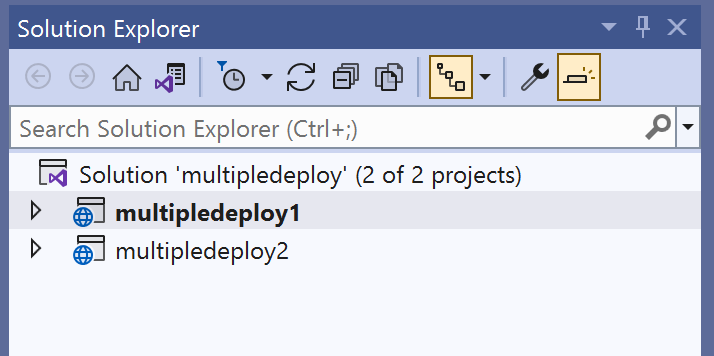
This is how our solution looks like. We have a single solution called multipledeploy with two projects or web applications in it. We want to publish it in single Web App.

Azure Web App

We configured our Web App having S1 plan with these two path mappings. Note that, these are 2 separate applications.

Publish Profile

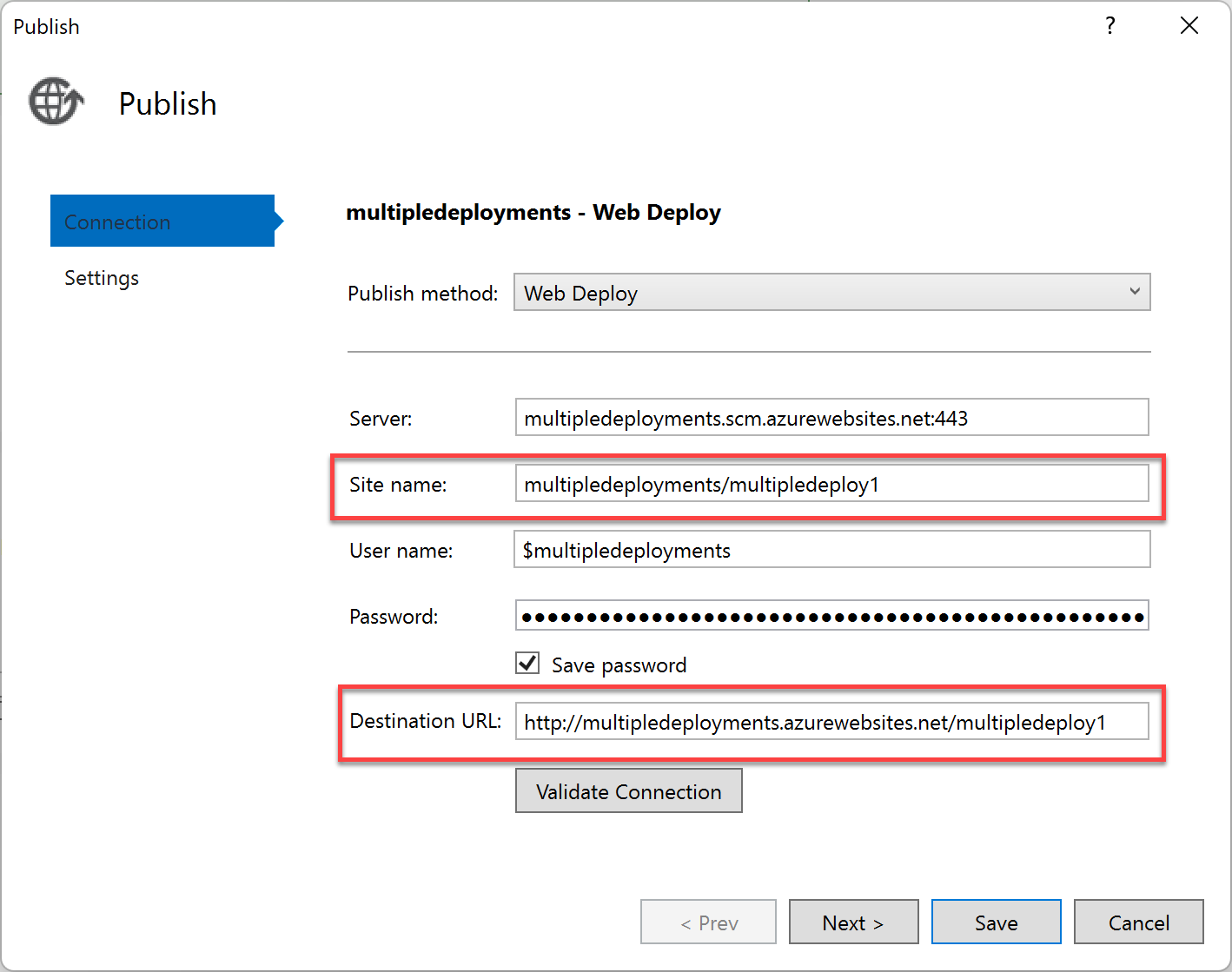
In the Publish Profile we made changes to ‘Site name’ and ‘Destination URL’ properties by appending individual site names like multipledeploy1 and 2. This will make sure to deploy these web sites individually in different folders in IIS.

The Problem

This deployed 2 websites in 2 different folders (treated as Applications) in a single Azure Web App. And both these apps ran for the 1st time. However, we got the error.

This is a typical ASP.NET error which says, we can’t run multiple apps in same host/pool. We need to create separate pools for each apps. However, there is no setting for that. So, what’s the solution?

The Solution

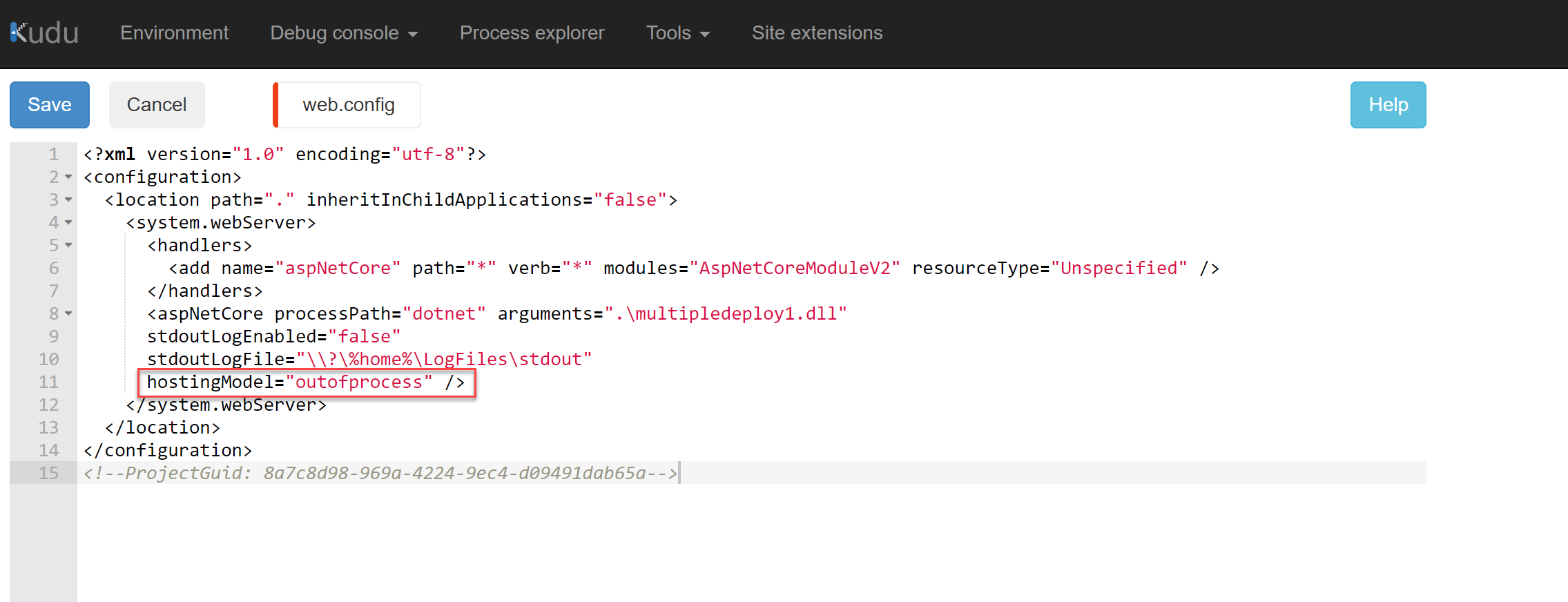
When you deploy or publish the app, web.config file is generated on IIS. You can manually add that to your project as well. In that file, you can mention to run the web application in ‘outofprocess‘. Add this value to hostingModel.

This will run both the applications in their own application pool. Refresh or restart the app to see the effect.

Conclusion

It is possible to run multiple web applications in Azure Web App. You just need to make sure you’re publishing these apps in right folders and setting it up to use out of process hosting model.

Happy coding:)

Namaste,
Mayur Tendulkar